UI-ஐ விவரித்தல்
React என்பது user interfaces (UI) render செய்யும் JavaScript library. Buttons, text, images போன்ற சிறிய units-இலிருந்து UI build செய்யப்படுகிறது. அவற்றை reusable, nest செய்யக்கூடிய components ஆக இணைக்க React உதவுகிறது. Websites முதல் phone apps வரை, screen-இல் உள்ள அனைத்தையும் components-ஆகப் பிரிக்கலாம். இந்த chapter-இல், React components உருவாக்க, customize செய்ய, conditionally display செய்ய கற்பீர்கள்.
இந்த அத்தியாயத்தில் நீங்கள் கற்றுக்கொள்ள போவது
- உங்கள் முதல் React component-ஐ எழுதுவது எப்படி
- Multi-component files எப்போது, எப்படி உருவாக்குவது
- JSX மூலம் JavaScript-க்கு markup சேர்ப்பது எப்படி
- உங்கள் components-இலிருந்து JavaScript functionality அணுக JSX-இல் curly braces பயன்படுத்துவது எப்படி
- Props கொண்டு components-ஐ configure செய்வது எப்படி
- Components-ஐ conditionally render செய்வது எப்படி
- ஒரே நேரத்தில் பல components render செய்வது எப்படி
- Components pure ஆக வைத்திருந்து confusing bugs தவிர்ப்பது எப்படி
- உங்கள் UI-ஐ trees ஆக புரிந்துகொள்வது ஏன் பயனுள்ளதாகும்
உங்கள் முதல் component
React applications components என்று அழைக்கப்படும் UI-ன் தனித்தனி பகுதிகளால் build செய்யப்படுகின்றன. React component என்பது markup சேர்க்கக்கூடிய JavaScript function. Components ஒரு button அளவுக்கு சிறியதாகவோ, முழு page அளவுக்கு பெரியதாகவோ இருக்கலாம். மூன்று Profile components render செய்யும் Gallery component இதோ:
function Profile() {
  return (
    <img
      src="https://react.dev/images/docs/scientists/MK3eW3As.jpg"
      alt="Katherine Johnson"
    />
  );
}

export default function Gallery() {
  return (
    <section>
      <h1>அற்புதமான விஞ்ஞானிகள்</h1>
      <Profile />
      <Profile />
      <Profile />
    </section>
  );
}
Ready to learn this topic?
React components declare மற்றும் use செய்வது எப்படி என்பதை அறிய உங்கள் முதல் Component படிக்கவும்.
Read MoreComponents-ஐ import மற்றும் export செய்தல்
ஒரே file-இல் பல components declare செய்யலாம்; ஆனால் பெரிய files navigate செய்ய கடினமாகலாம். இதைத் தீர்க்க, component-ஐ அதன் சொந்த file-க்கு export செய்து, பின்னர் அந்த component-ஐ மற்றொரு file-இலிருந்து import செய்யலாம்:
import Profile from './Profile.js';

export default function Gallery() {
  return (
    <section>
      <h1>அற்புதமான விஞ்ஞானிகள்</h1>
      <Profile />
      <Profile />
      <Profile />
    </section>
  );
}
Ready to learn this topic?
Components-ஐ தனித்தனி files-ஆக split செய்வது எப்படி என்பதை அறிய Components-ஐ Import மற்றும் Export செய்தல் படிக்கவும்.
Read MoreJSX கொண்டு markup எழுதுதல்
ஒவ்வொரு React component-உம் browser-இல் React render செய்யும் சில markup கொண்டிருக்கக்கூடிய JavaScript function. அந்த markup-ஐ represent செய்ய React components JSX என்ற syntax extension பயன்படுத்துகின்றன. JSX HTML போலவே தெரியும்; ஆனால் அது சற்று strict, மேலும் dynamic information display செய்ய முடியும்.
Existing HTML markup-ஐ React component-க்குள் paste செய்தால், அது எப்போதும் வேலை செய்யாது:
export default function TodoList() {
  return (
    // This doesn't quite work!
    <h1>Hedy Lamarr-ன் Todos</h1>
    <img
      src="https://react.dev/images/docs/scientists/yXOvdOSs.jpg"
      alt="Hedy Lamarr"
      class="photo"
    >
    <ul>
      <li>புதிய traffic lights கண்டுபிடி
      <li>Movie scene rehearsal செய்
      <li>Spectrum technology-ஐ மேம்படுத்து
    </ul>
இப்படிப்பட்ட existing HTML இருந்தால், converter பயன்படுத்தி அதை சரிசெய்யலாம்:
export default function TodoList() {
  return (
    <>
      <h1>Hedy Lamarr-ன் Todos</h1>
      <img
        src="https://react.dev/images/docs/scientists/yXOvdOSs.jpg"
        alt="Hedy Lamarr"
        className="photo"
      />
      <ul>
        <li>புதிய traffic lights கண்டுபிடி</li>
        <li>Movie scene rehearsal செய்</li>
        <li>Spectrum technology-ஐ மேம்படுத்து</li>
      </ul>
    </>
  );
}
Ready to learn this topic?
Valid JSX எழுதுவது எப்படி என்பதை அறிய JSX கொண்டு Markup எழுதுதல் படிக்கவும்.
Read MoreCurly braces உடன் JSX-இல் JavaScript
JSX, JavaScript file-க்குள் HTML போன்ற markup எழுத உதவுகிறது; இதனால் rendering logic மற்றும் content ஒரே இடத்தில் இருக்கும். சில சமயம் அந்த markup-க்குள் சிறிது JavaScript logic சேர்க்கவோ dynamic property ஒன்றை reference செய்யவோ நீங்கள் விரும்புவீர்கள். இப்படிப்பட்ட சூழலில், JSX-இல் curly braces பயன்படுத்தி JavaScript-க்கு “ஒரு சாளரம் திறக்கலாம்”:
const person = {
  name: 'Gregorio Y. Zara',
  theme: {
    backgroundColor: 'black',
    color: 'pink'
  }
};

export default function TodoList() {
  return (
    <div style={person.theme}>
      <h1>{person.name}-ன் Todos</h1>
      <img
        className="avatar"
        src="https://react.dev/images/docs/scientists/7vQD0fPs.jpg"
        alt="Gregorio Y. Zara"
      />
      <ul>
        <li>Videophone-ஐ மேம்படுத்து</li>
        <li>Aeronautics lectures தயார் செய்</li>
        <li>Alcohol-fuelled engine-ல் வேலை செய்</li>
      </ul>
    </div>
  );
}
Ready to learn this topic?
JSX-இலிருந்து JavaScript data-வை access செய்வது எப்படி என்பதை அறிய Curly Braces உடன் JSX-இல் JavaScript படிக்கவும்.
Read MoreComponent-க்கு props அனுப்புதல்
React components ஒருவருடன் ஒருவர் தொடர்புகொள்ள props பயன்படுத்துகின்றன. ஒவ்வொரு parent component-உம் தனது child components-க்கு props கொடுத்து சில information pass செய்யலாம். Props உங்களுக்கு HTML attributes-ஐ நினைவூட்டலாம்; ஆனால் objects, arrays, functions, JSX கூட உட்பட எந்த JavaScript value-யையும் அவற்றின் மூலம் pass செய்யலாம்!
import { getImageUrl } from './utils.js'

export default function Profile() {
  return (
    <Card>
      <Avatar
        size={100}
        person={{
          name: 'Katsuko Saruhashi',
          imageId: 'YfeOqp2'
        }}
      />
    </Card>
  );
}

function Avatar({ person, size }) {
  return (
    <img
      className="avatar"
      src={getImageUrl(person)}
      alt={person.name}
      width={size}
      height={size}
    />
  );
}

function Card({ children }) {
  return (
    <div className="card">
      {children}
    </div>
  );
}
Ready to learn this topic?
Props-ஐ pass செய்து read செய்வது எப்படி என்பதை அறிய Component-க்கு Props அனுப்புதல் படிக்கவும்.
Read MoreConditional rendering
உங்கள் components வெவ்வேறு conditions-ஐப் பொறுத்து வெவ்வேறு விஷயங்களை display செய்ய வேண்டியிருக்கும். React-இல், if statements, &&, ? : operators போன்ற JavaScript syntax பயன்படுத்தி JSX-ஐ conditionally render செய்யலாம்.
இந்த example-இல், checkmark ஒன்றை conditionally render செய்ய JavaScript && operator பயன்படுத்தப்படுகிறது:
function Item({ name, isPacked }) {
  return (
    <li className="item">
      {name} {isPacked && '✅'}
    </li>
  );
}

export default function PackingList() {
  return (
    <section>
      <h1>Sally Ride-ன் Packing List</h1>
      <ul>
        <Item
          isPacked={true}
          name="Space suit"
        />
        <Item
          isPacked={true}
          name="Golden leaf கொண்ட helmet"
        />
        <Item
          isPacked={false}
          name="Tam-ன் photo"
        />
      </ul>
    </section>
  );
}
Ready to learn this topic?
Content-ஐ conditionally render செய்யும் வெவ்வேறு வழிகளை அறிய Conditional Rendering படிக்கவும்.
Read MoreLists render செய்தல்
Data collection-இலிருந்து பல ஒத்த components-ஐ display செய்ய நீங்கள் அடிக்கடி விரும்புவீர்கள். உங்கள் data array-ஐ components array-ஆக filter செய்து transform செய்ய React உடன் JavaScript-ன் filter() மற்றும் map() பயன்படுத்தலாம்.
ஒவ்வொரு array item-க்கும் key ஒன்றை குறிப்பிட வேண்டும். பொதுவாக, database-இலிருந்து வரும் ID-ஐ key ஆக பயன்படுத்த விரும்புவீர்கள். List மாறினாலும் ஒவ்வொரு item-ன் இடத்தை React track செய்ய keys உதவுகின்றன.
import { people } from './data.js';
import { getImageUrl } from './utils.js';

export default function List() {
  const listItems = people.map(person =>
    <li key={person.id}>
      <img
        src={getImageUrl(person)}
        alt={person.name}
      />
      <p>
        <b>{person.name}:</b>
        {' ' + person.profession + ' '}
        புகழ்பெற்றது: {person.accomplishment}
      </p>
    </li>
  );
  return (
    <article>
      <h1>விஞ்ஞானிகள்</h1>
      <ul>{listItems}</ul>
    </article>
  );
}
Ready to learn this topic?
Components list render செய்வது எப்படி, key தேர்வு செய்வது எப்படி என்பதை அறிய Lists render செய்தல் படிக்கவும்.
Read MoreComponents pure ஆக வைத்திருத்தல்
சில JavaScript functions pure ஆக இருக்கும். Pure function:
- தன் வேலையை மட்டும் செய்கிறது. அது call செய்யப்படுவதற்கு முன் இருந்த objects அல்லது variables எதையும் மாற்றாது.
- அதே inputs, அதே output. அதே inputs கொடுக்கப்பட்டால், pure function எப்போதும் அதே result return செய்ய வேண்டும்.
உங்கள் components-ஐ strict ஆக pure functions ஆக மட்டும் எழுதுவதன் மூலம், உங்கள் codebase வளரும்போது baffling bugs மற்றும் unpredictable behavior-ன் முழு வகையையே தவிர்க்கலாம். Impure component ஒன்றின் example இதோ:
let guest = 0;

function Cup() {
  // Bad: changing a preexisting variable!
  guest = guest + 1;
  return <h2>விருந்தினர் #{guest}-க்கான தேநீர் கோப்பை</h2>;
}

export default function TeaSet() {
  return (
    <>
      <Cup />
      <Cup />
      <Cup />
    </>
  );
}
ஏற்கனவே உள்ள variable-ஐ modify செய்வதற்கு பதிலாக prop pass செய்து இந்த component-ஐ pure ஆக்கலாம்:
function Cup({ guest }) {
  return <h2>விருந்தினர் #{guest}-க்கான தேநீர் கோப்பை</h2>;
}

export default function TeaSet() {
  return (
    <>
      <Cup guest={1} />
      <Cup guest={2} />
      <Cup guest={3} />
    </>
  );
}
Ready to learn this topic?
Components-ஐ pure, predictable functions ஆக எழுதுவது எப்படி என்பதை அறிய Components pure ஆக வைத்திருத்தல் படிக்கவும்.
Read Moreஉங்கள் UI ஒரு tree ஆக
Components மற்றும் modules இடையிலான relationships-ஐ model செய்ய React trees பயன்படுத்துகிறது.
React render tree என்பது components இடையிலான parent மற்றும் child relationship-ன் representation.
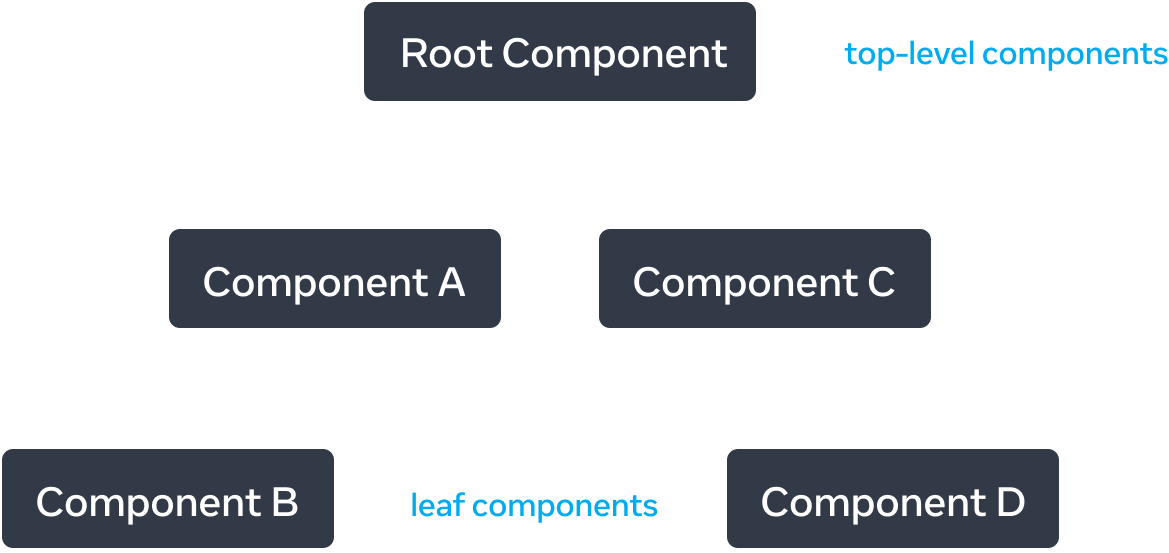

React render tree-க்கான example.
Tree-ன் மேல் பகுதியில், root component-க்கு அருகில் இருக்கும் components top-level components என்று கருதப்படுகின்றன. Child components இல்லாத components leaf components. Data flow மற்றும் rendering performance புரிந்துகொள்ள இந்த component categorization பயனுள்ளதாகும்.
JavaScript modules இடையிலான relationship-ஐ model செய்வதும் உங்கள் app-ஐ புரிந்துகொள்ள மற்றொரு பயனுள்ள வழி. இதை module dependency tree என்று அழைக்கிறோம்.
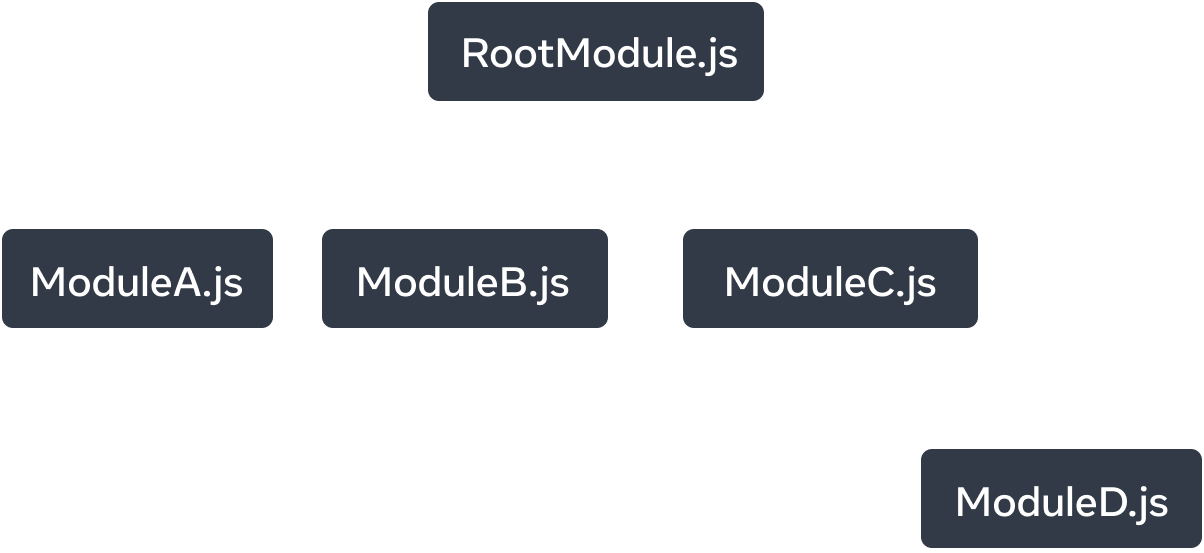
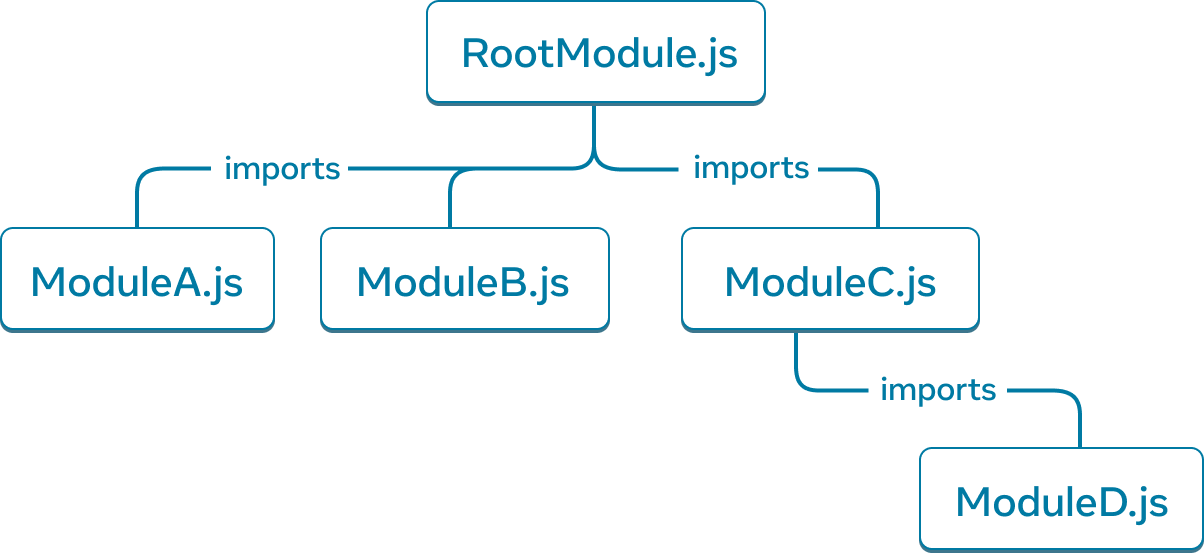
Module dependency tree-க்கான example.
Client download செய்து render செய்ய வேண்டிய அனைத்து தொடர்புடைய JavaScript code-யையும் bundle செய்ய build tools dependency tree-ஐ அடிக்கடி பயன்படுத்துகின்றன. பெரிய bundle size React apps-ன் user experience-ஐ பாதிக்கும். இப்படிப்பட்ட issues debug செய்ய module dependency tree புரிந்திருப்பது உதவிகரமாகும்.
Ready to learn this topic?
React app-க்கு render மற்றும் module dependency trees உருவாக்குவது எப்படி, user experience மற்றும் performance மேம்படுத்த அவை ஏன் பயனுள்ள mental models என்பதை அறிய உங்கள் UI ஒரு Tree ஆக படிக்கவும்.
Read Moreஅடுத்து என்ன?
இந்த chapter-ஐ page by page படிக்கத் தொடங்க உங்கள் முதல் Component-க்கு செல்லுங்கள்!
அல்லது, இந்த topics ஏற்கனவே தெரிந்திருந்தால், Interactivity சேர்த்தல் பற்றி படிக்கலாமே?