உங்கள் UI-ஐ tree ஆகப் புரிந்துகொள்ளுதல்
உங்கள் React app, பல components ஒன்றுக்குள் ஒன்று nested ஆகி வடிவம் பெறுகிறது. உங்கள் app-ன் component structure-ஐ React எப்படி track செய்கிறது?
React மற்றும் பல UI libraries, UI-ஐ tree ஆக model செய்கின்றன. உங்கள் app-ஐ tree ஆக சிந்திப்பது components இடையிலான உறவைப் புரிந்துகொள்ள பயனுள்ளதாகும். இந்த புரிதல் performance மற்றும் state management போன்ற எதிர்கால concepts-ஐ debug செய்ய உதவும்.
நீங்கள் கற்றுக்கொள்ள போவது
- Component structures-ஐ React எப்படி “பார்க்கிறது”
- Render tree என்றால் என்ன, அது எதற்கு பயனுள்ளது
- Module dependency tree என்றால் என்ன, அது எதற்கு பயனுள்ளது
உங்கள் UI ஒரு tree ஆக
Trees என்பது items இடையிலான relationship model. UI பெரும்பாலும் tree structures மூலம் represent செய்யப்படுகிறது. உதாரணமாக, browsers HTML (DOM) மற்றும் CSS (CSSOM) model செய்ய tree structures பயன்படுத்துகின்றன. Mobile platforms-யும் தங்களின் view hierarchy-ஐ represent செய்ய trees பயன்படுத்துகின்றன.
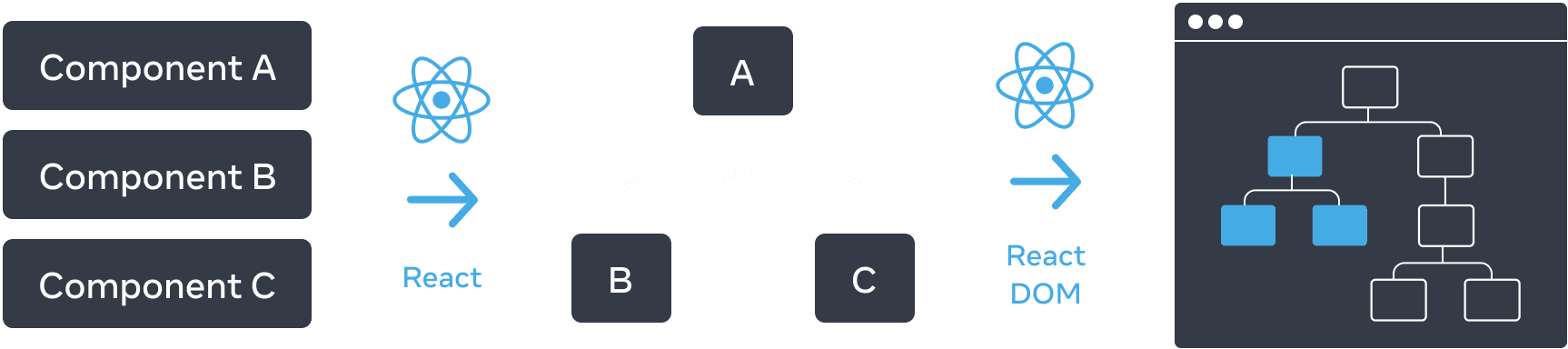
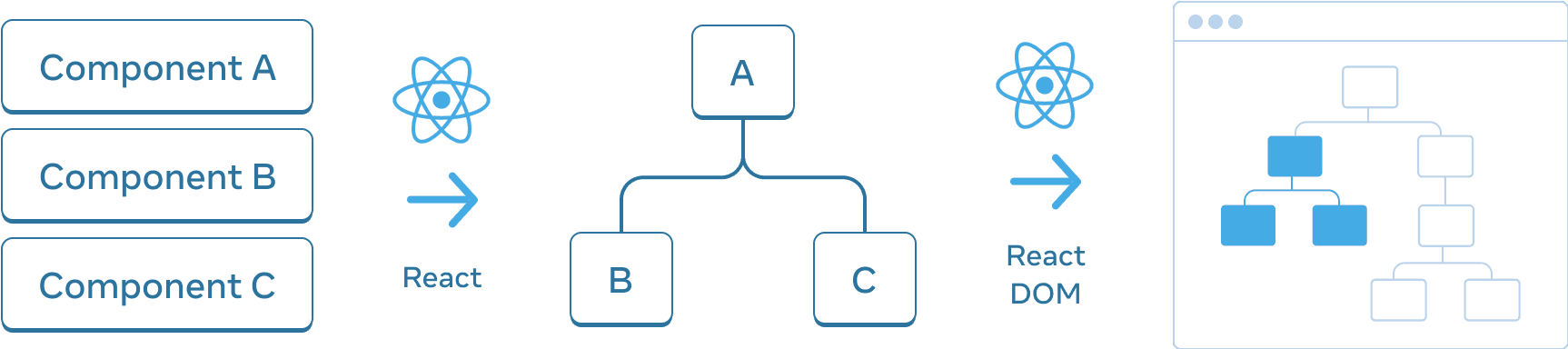
React உங்கள் components-இலிருந்து UI tree ஒன்றை உருவாக்குகிறது. இந்த example-இல், UI tree பின்னர் DOM-க்கு render செய்ய பயன்படுத்தப்படுகிறது.
Browsers மற்றும் mobile platforms போலவே, React app-இல் components இடையிலான உறவை manage மற்றும் model செய்ய React-யும் tree structures பயன்படுத்துகிறது. React app வழியாக data எப்படி flow ஆகிறது, rendering மற்றும் app size-ஐ எப்படி optimize செய்வது என்பதைக் புரிந்துகொள்ள இந்த trees பயனுள்ள tools.
Render tree
Components-ன் முக்கிய feature ஒன்று, மற்ற components-இன் components-ஐ compose செய்யும் திறன். நாம் components-ஐ nest செய்யும்போது, parent மற்றும் child components என்ற concept வருகிறது; ஒவ்வொரு parent component-யும் தானே மற்றொரு component-ன் child ஆக இருக்கலாம்.
React app ஒன்றை render செய்யும்போது, இந்த relationship-ஐ render tree எனப்படும் tree-இல் model செய்யலாம்.
Inspirational quotes render செய்யும் React app இதோ.
import FancyText from './FancyText';
import InspirationGenerator from './InspirationGenerator';
import Copyright from './Copyright';

export default function App() {
  return (
    <>
      <FancyText title text="ஊக்கம் தரும் app" />
      <InspirationGenerator>
        <Copyright year={2004} />
      </InspirationGenerator>
    </>
  );
}
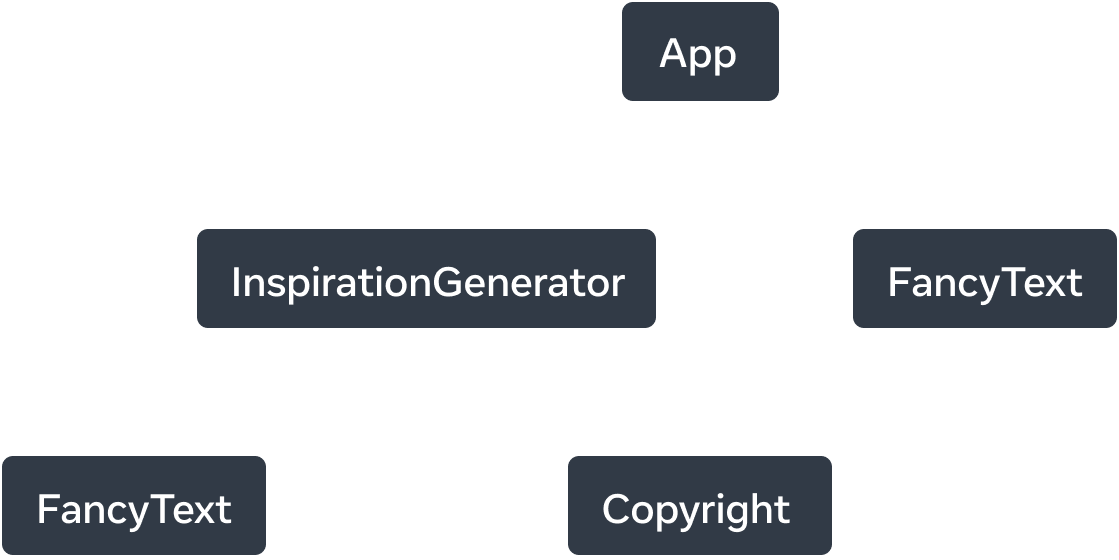
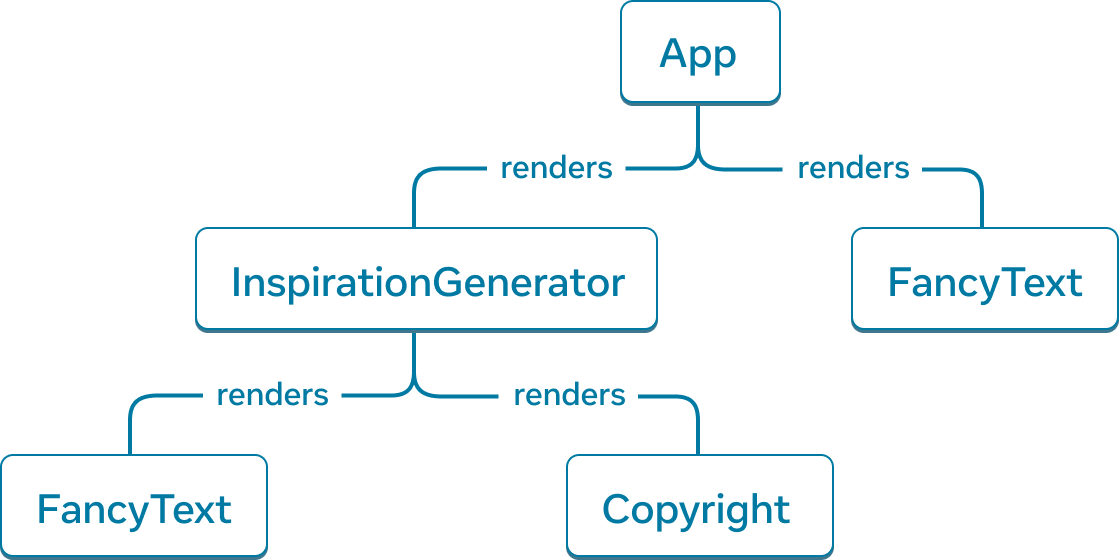
Rendered components-ஆல் composed ஆன UI tree-யான render tree-யை React உருவாக்குகிறது.
Example app-இலிருந்து, மேலுள்ள render tree-ஐ construct செய்யலாம்.
Tree nodes-ஆல் composed ஆகும்; ஒவ்வொரு node-யும் ஒரு component-ஐ represent செய்கிறது. App, FancyText, Copyright போன்றவை எல்லாம் எங்கள் tree-இல் nodes.
React render tree-இல் root node என்பது app-ன் root component. இந்த case-இல், root component App; React render செய்யும் முதல் component அதுவே. Tree-இல் உள்ள ஒவ்வொரு arrow-வும் parent component-இலிருந்து child component நோக்கி காட்டுகிறது.
Deep Dive
மேலுள்ள render tree-இல், ஒவ்வொரு component render செய்யும் HTML tags பற்றி mention இல்லை என்பதை கவனிப்பீர்கள். ஏனெனில் render tree, React components மட்டுமே கொண்டதாக இருக்கும்.
React, UI framework ஆக, platform agnostic. react.dev-இல், web-க்கு render செய்யும் examples-ஐ நாங்கள் காட்டுகிறோம்; web, HTML markup-ஐ அதன் UI primitives ஆக பயன்படுத்துகிறது. ஆனால் React app ஒன்று mobile அல்லது desktop platform-க்கும் render செய்யலாம்; அவை UIView அல்லது FrameworkElement போன்ற வேறு UI primitives பயன்படுத்தலாம்.
இந்த platform UI primitives React-ன் பகுதியாக இல்லை. உங்கள் app எந்த platform-க்கு render செய்தாலும், React render trees எங்கள் React app பற்றி insight வழங்க முடியும்.
Render tree, React application-ன் ஒரு single render pass-ஐ represent செய்கிறது. Conditional rendering உடன், parent component, pass செய்யப்பட்ட data-வைப் பொறுத்து வேறு children render செய்யலாம்.
Inspirational quote அல்லது color ஒன்றை conditionally render செய்ய app-ஐ update செய்யலாம்.
import FancyText from './FancyText';
import InspirationGenerator from './InspirationGenerator';
import Copyright from './Copyright';

export default function App() {
  return (
    <>
      <FancyText title text="ஊக்கம் தரும் app" />
      <InspirationGenerator>
        <Copyright year={2004} />
      </InspirationGenerator>
    </>
  );
}
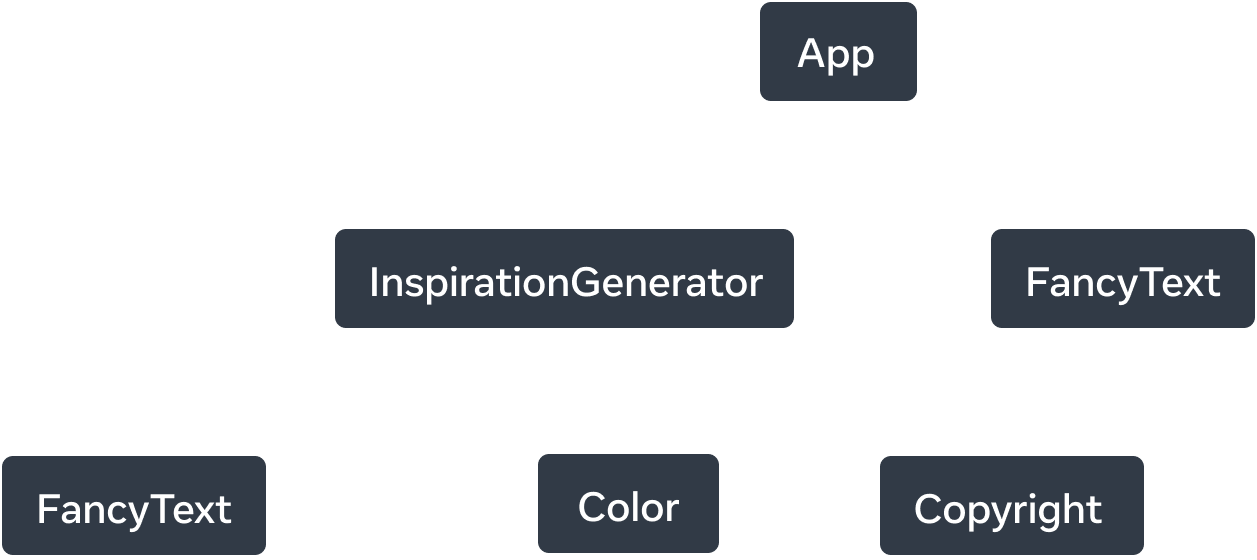
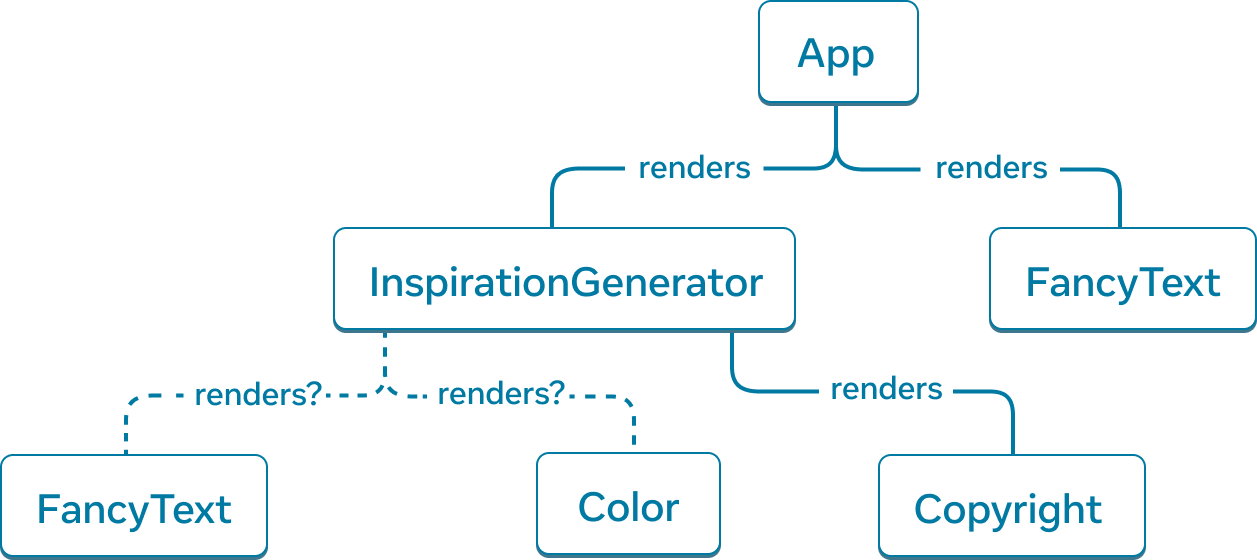
Conditional rendering உடன், வெவ்வேறு renders முழுவதும் render tree வேறு components render செய்யலாம்.
இந்த example-இல், inspiration.type என்ன என்பதைப் பொறுத்து, <FancyText> அல்லது <Color> render செய்யலாம். ஒவ்வொரு render pass-க்கும் render tree வேறுபடலாம்.
Render passes முழுவதும் render trees மாறினாலும், React app-இல் top-level மற்றும் leaf components என்ன என்பதை identify செய்ய இந்த trees பொதுவாக உதவும். Top-level components root component-க்கு மிக அருகிலுள்ள components; அவை தங்களுக்குக் கீழுள்ள அனைத்து components-ன் rendering performance-ஐ பாதிக்கும் மற்றும் பெரும்பாலும் அதிக complexity கொண்டிருக்கும். Leaf components tree-ன் கீழ்பகுதிக்கு அருகில் இருக்கும்; child components இல்லாது, அவை பெரும்பாலும் அடிக்கடி re-render ஆகும்.
இந்த component categories-ஐ identify செய்வது உங்கள் app-ன் data flow மற்றும் performance-ஐப் புரிந்துகொள்ள பயனுள்ளதாகும்.
Module dependency tree
React app-இல் tree மூலம் model செய்யக்கூடிய மற்றொரு relationship, app-ன் module dependencies. நாங்கள் components மற்றும் logic-ஐ தனித்தனியான files-ஆக பிரிக்கும் போது, components, functions, அல்லது constants export செய்யக்கூடிய JS modules உருவாக்குகிறோம்.
Module dependency tree-இல் ஒவ்வொரு node-யும் ஒரு module; ஒவ்வொரு branch-வும் அந்த module-இல் உள்ள import statement-ஐ represent செய்கிறது.
முந்தைய Inspirations app-ஐ எடுத்துக்கொண்டால், module dependency tree, அல்லது சுருக்கமாக dependency tree, உருவாக்கலாம்.
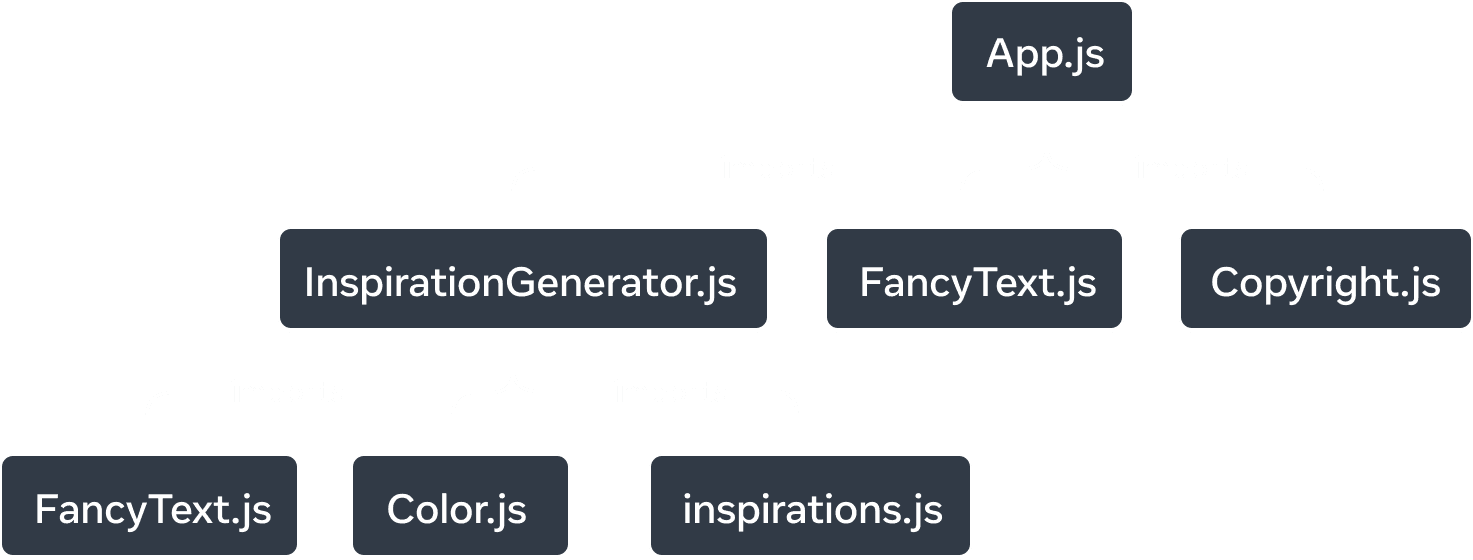
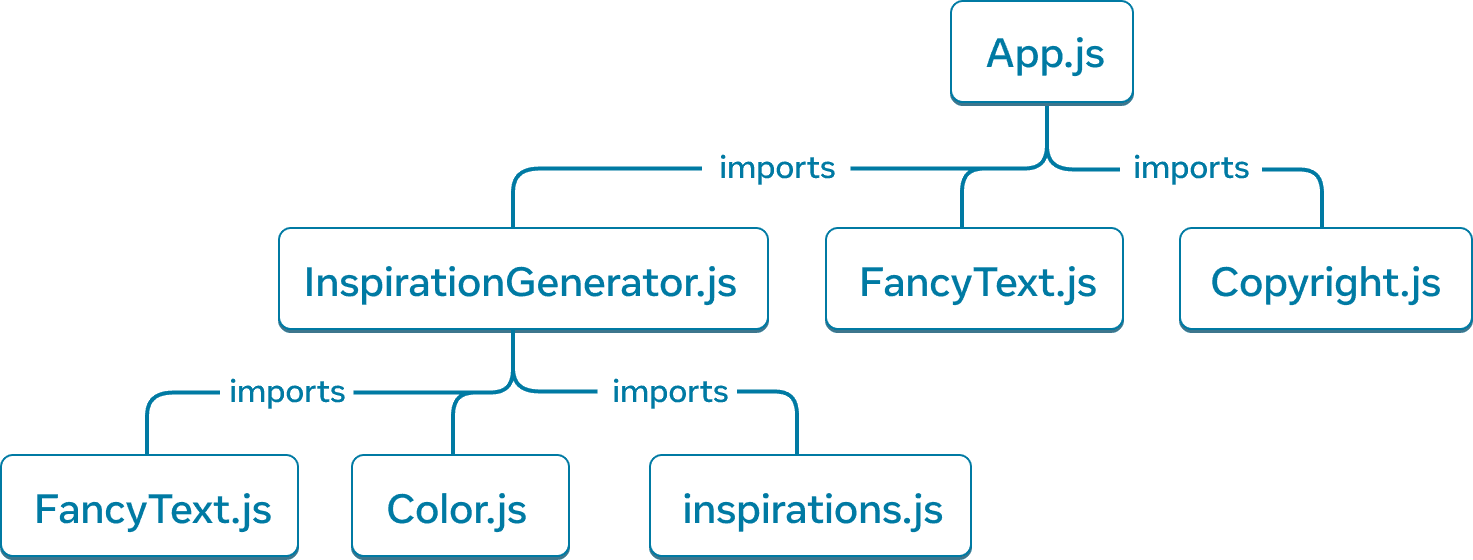
Inspirations app-க்கான module dependency tree.
Tree-ன் root node என்பது root module; இது entrypoint file என்றும் அழைக்கப்படுகிறது. இது பெரும்பாலும் root component கொண்ட module ஆக இருக்கும்.
அதே app-ன் render tree உடன் ஒப்பிடும்போது, சில similar structures உள்ளன; ஆனால் சில குறிப்பிடத்தக்க differences உள்ளன:
- Tree-ஐ உருவாக்கும் nodes modules-ஐ represent செய்கின்றன; components அல்ல.
inspirations.jsபோன்ற non-component modules-யும் இந்த tree-இல் represent செய்யப்படுகின்றன. Render tree components-ஐ மட்டுமே encapsulate செய்கிறது.Copyright.js,App.js-ன் கீழ் தோன்றுகிறது; ஆனால் render tree-இல் component ஆனCopyright,InspirationGenerator-ன் child ஆக தோன்றுகிறது. ஏனெனில்InspirationGenerator, JSX-ஐ children props ஆக ஏற்கிறது; அதனால்Copyright-ஐ child component ஆக render செய்கிறது, ஆனால் module-ஐ import செய்வதில்லை.
உங்கள் React app run ஆக எந்த modules தேவை என்பதை தீர்மானிக்க dependency trees பயனுள்ளதாகும். Production-க்காக React app build செய்யும்போது, client-க்கு ship செய்ய தேவையான JavaScript அனைத்தையும் bundle செய்யும் build step பொதுவாக இருக்கும். இதற்கு பொறுப்பான tool bundler என்று அழைக்கப்படுகிறது; எந்த modules include செய்யப்பட வேண்டும் என்பதை தீர்மானிக்க bundlers dependency tree-ஐ பயன்படுத்தும்.
உங்கள் app வளரும்போது, bundle size-மும் பெரும்பாலும் வளர்கிறது. பெரிய bundle sizes client download செய்து run செய்ய அதிக செலவானவை. பெரிய bundle sizes, உங்கள் UI draw ஆகும் நேரத்தை தாமதப்படுத்தலாம். உங்கள் app-ன் dependency tree பற்றிய ஒரு புரிதல், இந்த issues debug செய்ய உதவலாம்.
Recap
- Entities இடையிலான relationship-ஐ represent செய்ய trees பொதுவான வழி. அவை UI model செய்ய அடிக்கடி பயன்படுத்தப்படுகின்றன.
- Render trees, ஒரு single render முழுவதும் React components இடையிலான nested relationship-ஐ represent செய்கின்றன.
- Conditional rendering உடன், render tree வெவ்வேறு renders-இல் மாறலாம். வேறு prop values உடன், components வேறு child components render செய்யலாம்.
- Render trees, top-level மற்றும் leaf components என்ன என்பதை identify செய்ய உதவுகின்றன. Top-level components அவற்றுக்குக் கீழுள்ள அனைத்து components-ன் rendering performance-ஐ பாதிக்கின்றன; leaf components பெரும்பாலும் அடிக்கடி re-render செய்யப்படுகின்றன. Rendering performance-ஐப் புரிந்து debug செய்ய அவற்றை identify செய்வது பயனுள்ளதாகும்.
- Dependency trees, React app-இல் module dependencies-ஐ represent செய்கின்றன.
- App ship செய்ய தேவையான code-ஐ bundle செய்ய build tools dependency trees-ஐ பயன்படுத்துகின்றன.
- Time to paint-ஐ slow ஆக்கும் பெரிய bundle sizes-ஐ debug செய்யவும், எந்த code bundle செய்யப்படுகிறது என்பதை optimize செய்யும் வாய்ப்புகளை வெளிப்படுத்தவும் dependency trees பயனுள்ளதாகும்.