Components-ஐ import மற்றும் export செய்தல்
Components-ன் magic அவற்றின் reusability-யில் உள்ளது: மற்ற components-ஆல் composed ஆன components உருவாக்கலாம். ஆனால் மேலும் மேலும் components nest செய்யும்போது, அவற்றை வெவ்வேறு files-ஆக split செய்யத் தொடங்குவது பெரும்பாலும் அர்த்தமுள்ளது. இதனால் உங்கள் files நேரடியாக scan செய்யக்கூடியதாக இருக்கும்; components-ஐ அதிக இடங்களில் reuse செய்யலாம்.
நீங்கள் கற்றுக்கொள்ள போவது
- Root component file என்றால் என்ன
- Component ஒன்றை import மற்றும் export செய்வது எப்படி
- Default மற்றும் named imports/exports எப்போது பயன்படுத்துவது
- ஒரே file-இலிருந்து multiple components import மற்றும் export செய்வது எப்படி
- Components-ஐ multiple files-ஆக split செய்வது எப்படி
Root component file
உங்கள் முதல் component-இல், நீங்கள் Profile component மற்றும் அதை render செய்யும் Gallery component உருவாக்கினீர்கள்:
function Profile() {
  return (
    <img
      src="https://react.dev/images/docs/scientists/MK3eW3As.jpg"
      alt="Katherine Johnson"
    />
  );
}

export default function Gallery() {
  return (
    <section>
      <h1>அற்புதமான விஞ்ஞானிகள்</h1>
      <Profile />
      <Profile />
      <Profile />
    </section>
  );
}
இவை தற்போது இந்த example-இல் App.js என்று பெயரிடப்பட்ட root component file-இல் உள்ளன. உங்கள் setup-ஐப் பொறுத்து, உங்கள் root component வேறு file-இலுமிருக்கலாம். Next.js போன்ற file-based routing கொண்ட framework பயன்படுத்தினால், ஒவ்வொரு page-க்கும் உங்கள் root component வேறுபடும்.
Component ஒன்றை export மற்றும் import செய்தல்
எதிர்காலத்தில் landing screen மாற்றி அங்கே science books list வைக்க விரும்பினால் என்ன? அல்லது அனைத்து profiles-யையும் வேறு இடத்தில் வைக்க விரும்பினால்? Gallery மற்றும் Profile-ஐ root component file-இலிருந்து வெளியே நகர்த்துவது அர்த்தமுள்ளது. இது அவற்றை மற்ற files-இல் மேலும் modular மற்றும் reusable ஆக்கும். Component ஒன்றை மூன்று steps-இல் நகர்த்தலாம்:
- Components வைக்க புதிய JS file ஒன்றை உருவாக்கவும்.
- அந்த file-இலிருந்து உங்கள் function component-ஐ export செய்யவும் (default அல்லது named exports பயன்படுத்தி).
- Component-ஐ பயன்படுத்தும் file-இல் அதை import செய்யவும் (default அல்லது named exports import செய்யும் corresponding technique பயன்படுத்தி).
இங்கே Profile மற்றும் Gallery இரண்டும் App.js-இலிருந்து Gallery.js என்ற புதிய file-க்கு moved செய்யப்பட்டுள்ளன. இப்போது Gallery.js-இலிருந்து Gallery import செய்ய App.js மாற்றலாம்:
import Gallery from './Gallery.js';

export default function App() {
  return (
    <Gallery />
  );
}
இந்த example இப்போது இரண்டு component files-ஆக broken down ஆகியுள்ளது என்பதை கவனிக்கவும்:
Gallery.js:- அதே file-இல் மட்டும் பயன்படுத்தப்படும், export செய்யப்படாத
Profilecomponent-ஐ define செய்கிறது. Gallerycomponent-ஐ default export ஆக export செய்கிறது.
- அதே file-இல் மட்டும் பயன்படுத்தப்படும், export செய்யப்படாத
App.js:Gallery.js-இலிருந்துGallery-ஐ default import ஆக import செய்கிறது.- Root
Appcomponent-ஐ default export ஆக export செய்கிறது.
Deep Dive
JavaScript-இல் values export செய்ய இரண்டு primary வழிகள் உள்ளன: default exports மற்றும் named exports. இதுவரை, எங்கள் examples default exports மட்டும் பயன்படுத்தின. ஆனால் ஒரே file-இல் அவற்றில் ஒன்றையோ இரண்டையோ பயன்படுத்தலாம். ஒரு file-க்கு ஒன்றுக்கு மேல் default export இருக்க முடியாது; ஆனால் நீங்கள் விரும்பும் அளவு named exports இருக்கலாம்.
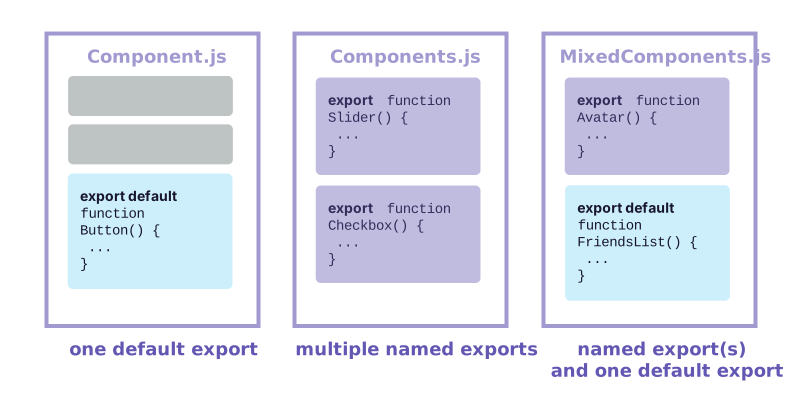
உங்கள் component-ஐ நீங்கள் எப்படி export செய்கிறீர்கள் என்பதே அதை எப்படி import செய்ய வேண்டும் என்பதை நிர்ணயிக்கிறது. Named export import செய்வது போல default export import செய்ய முயன்றால் error கிடைக்கும்! இந்த chart track வைத்திருக்க உதவும்:
| Syntax | Export statement | Import statement |
|---|---|---|
| Default | export default function Button() {} | import Button from './Button.js'; |
| Named | export function Button() {} | import { Button } from './Button.js'; |
Default import எழுதும்போது, import பிறகு நீங்கள் விரும்பும் எந்த பெயரையும் வைக்கலாம். உதாரணமாக, import Banana from './Button.js' என்று எழுதினாலும் அதே default export கிடைக்கும். மாறாக, named imports-இல் பெயர் இருபுறமும் match ஆக வேண்டும். அதனால் தான் அவை named imports என்று அழைக்கப்படுகின்றன!
File ஒரே component மட்டும் export செய்தால் மக்கள் default exports-ஐ அடிக்கடி பயன்படுத்துகிறார்கள்; multiple components மற்றும் values export செய்தால் named exports பயன்படுத்துகிறார்கள். எந்த coding style விரும்பினாலும், உங்கள் component functions மற்றும் அவை உள்ள files-க்கு எப்போதும் meaningful names கொடுக்கவும். export default () => {} போன்ற பெயர் இல்லாத components discouraged; ஏனெனில் அவை debugging-ஐ கடினமாக்கும்.
அதே file-இலிருந்து multiple components export மற்றும் import செய்தல்
Gallery-க்கு பதிலாக ஒரு Profile மட்டும் காட்ட விரும்பினால் என்ன? Profile component-யையும் export செய்யலாம். ஆனால் Gallery.js ஏற்கனவே default export கொண்டுள்ளது; இரண்டு default exports இருக்க முடியாது. Default export கொண்ட புதிய file உருவாக்கலாம், அல்லது Profile-க்கு named export சேர்க்கலாம். ஒரு file-க்கு ஒரு default export மட்டுமே இருக்க முடியும்; ஆனால் பல named exports இருக்கலாம்!
முதலில், named export பயன்படுத்தி (default keyword இல்லாமல்) Gallery.js-இலிருந்து Profile-ஐ export செய்யவும்:
export function Profile() {
  // ...
}
பிறகு, curly braces உடன் named import பயன்படுத்தி Gallery.js-இலிருந்து App.js-க்கு Profile-ஐ import செய்யவும்:
import { Profile } from './Gallery.js';இறுதியாக, App component-இலிருந்து <Profile />-ஐ render செய்யவும்:
export default function App() {
  return <Profile />;
}
இப்போது Gallery.js இரண்டு exports கொண்டுள்ளது: default Gallery export மற்றும் named Profile export. App.js அவை இரண்டையும் imports செய்கிறது. இந்த example-இல் <Profile />-ஐ <Gallery /> ஆகவும் மீண்டும் திருப்பியும் edit செய்து பாருங்கள்:
import Gallery from './Gallery.js';
import { Profile } from './Gallery.js';

export default function App() {
  return (
    <Profile />
  );
}
இப்போது நீங்கள் default மற்றும் named exports mix பயன்படுத்துகிறீர்கள்:
Gallery.js:Profilecomponent-ஐProfileஎன்ற named export ஆக export செய்கிறது.Gallerycomponent-ஐ default export ஆக export செய்கிறது.
App.js:Gallery.js-இலிருந்துProfile-ஐProfileஎன்ற named import ஆக import செய்கிறது.Gallery.js-இலிருந்துGallery-ஐ default import ஆக import செய்கிறது.- Root
Appcomponent-ஐ default export ஆக export செய்கிறது.
Recap
இந்த page-இல் நீங்கள் கற்றவை:
- Root component file என்றால் என்ன
- Component ஒன்றை import மற்றும் export செய்வது எப்படி
- Default மற்றும் named imports/exports எப்போது, எப்படி பயன்படுத்துவது
- அதே file-இலிருந்து multiple components export செய்வது எப்படி
Challenge 1 of 1: Components-ஐ மேலும் split செய்யுங்கள்
தற்போது, Gallery.js Profile மற்றும் Gallery இரண்டையும் export செய்கிறது; இது சிறிது confusing.
Profile component-ஐ அதன் சொந்த Profile.js-க்கு move செய்து, பிறகு App component-ஐ <Profile /> மற்றும் <Gallery /> இரண்டையும் ஒன்றுக்குப் பிறகு ஒன்று render செய்ய மாற்றவும்.
Profile-க்கு default அல்லது named export எதையும் பயன்படுத்தலாம்; ஆனால் App.js மற்றும் Gallery.js இரண்டிலும் corresponding import syntax பயன்படுத்துவதை உறுதிசெய்யவும்! மேலுள்ள deep dive-இலிருந்து table-ஐ refer செய்யலாம்:
| Syntax | Export statement | Import statement |
|---|---|---|
| Default | export default function Button() {} | import Button from './Button.js'; |
| Named | export function Button() {} | import { Button } from './Button.js'; |
// Move me to Profile.js!
export function Profile() {
  return (
    <img
      src="https://react.dev/images/docs/scientists/QIrZWGIs.jpg"
      alt="Alan L. Hart"
    />
  );
}

export default function Gallery() {
  return (
    <section>
      <h1>அற்புதமான விஞ்ஞானிகள்</h1>
      <Profile />
      <Profile />
      <Profile />
    </section>
  );
}
ஒரு வகை exports உடன் வேலை செய்ய வைத்த பிறகு, மற்ற வகையுடனும் வேலை செய்யச் செய்யுங்கள்.