'use client'
எந்த code client-இல் run ஆக வேண்டும் என்பதை mark செய்ய 'use client' அனுமதிக்கிறது.
Reference
'use client'
ஒரு file-ன் top-இல் 'use client' சேர்த்து, அந்த module மற்றும் அதன் transitive dependencies-ஐ client code ஆக mark செய்யவும்.
'use client';

import { useState } from 'react';
import { formatDate } from './formatters';
import Button from './button';

export default function RichTextEditor({ timestamp, text }) {
  const date = formatDate(timestamp);
  // ...
  const editButton = <Button />;
  // ...
}
'use client' mark செய்யப்பட்ட file ஒன்று Server Component-இலிருந்து import செய்யப்படும் போது, compatible bundlers அந்த module import-ஐ server-run code மற்றும் client-run code இடையிலான boundary ஆக treat செய்யும்.
RichTextEditor-ன் dependencies ஆக, formatDate மற்றும் Button modules-இல் 'use client' directive உள்ளதா இல்லையா என்பதைப் பொருட்படுத்தாமல் client-இல் evaluate செய்யப்படும். ஒரே module, server code-இலிருந்து import செய்யப்படும் போது server-இலும், client code-இலிருந்து import செய்யப்படும் போது client-இலும் evaluate செய்யப்படலாம் என்பதை கவனிக்கவும்.
Caveats
'use client'file-ன் மிகத் தொடக்கத்தில், imports அல்லது வேறு code-க்கு மேலே இருக்க வேண்டும் (comments OK). இது single அல்லது double quotes உடன் எழுதப்பட வேண்டும்; backticks உடன் அல்ல.'use client'module மற்றொரு client-rendered module-இலிருந்து import செய்யப்பட்டால், directive-க்கு effect இல்லை.- Component module
'use client'directive கொண்டிருந்தால், அந்த component-ன் எந்த usage-யும் Client Component ஆக guarantee செய்யப்படும். ஆனால்'use client'directive இல்லாவிட்டாலும் component client-இல் evaluate செய்யப்படலாம்.- Component usage,
'use client'directive கொண்ட module-இல் define செய்யப்பட்டிருந்தாலோ, அல்லது'use client'directive கொண்ட module-ன் transitive dependency ஆக இருந்தாலோ Client Component என கருதப்படும். இல்லையெனில் அது Server Component.
- Component usage,
- Client evaluation-க்கு mark செய்யப்பட்ட code components-க்கு மட்டும் வரையறுக்கப்படவில்லை. Client module sub-tree-யின் ஒரு பகுதியாக இருக்கும் அனைத்து code-யும் client-க்கு அனுப்பப்பட்டு client மூலம் run செய்யப்படும்.
- Server evaluated module ஒன்று
'use client'module-இலிருந்து values import செய்தால், அந்த values Client Component-க்கு pass செய்ய React component அல்லது supported serializable prop values ஆக இருக்க வேண்டும். வேறு எந்த use case-ம் exception throw செய்யும்.
'use client' client code-ஐ எப்படி mark செய்கிறது
React app-இல், components பெரும்பாலும் தனித்தனி files அல்லது modules-ஆக split செய்யப்படுகின்றன.
React Server Components பயன்படுத்தும் apps-க்கு, app default ஆக server-rendered. 'use client', module dependency tree-இல் server-client boundary அறிமுகப்படுத்தி, Client modules-ன் subtree ஒன்றை effectively உருவாக்குகிறது.
இதைக் தெளிவாக illustrate செய்ய, கீழுள்ள React Server Components app-ஐ கவனிக்கவும்.
import FancyText from './FancyText';
import InspirationGenerator from './InspirationGenerator';
import Copyright from './Copyright';

export default function App() {
  return (
    <>
      <FancyText title text="ஊக்கம் தரும் app" />
      <InspirationGenerator>
        <Copyright year={2004} />
      </InspirationGenerator>
    </>
  );
}
இந்த example app-ன் module dependency tree-இல், InspirationGenerator.js-இல் உள்ள 'use client' directive அந்த module மற்றும் அதன் அனைத்து transitive dependencies-ஐ Client modules ஆக mark செய்கிறது. InspirationGenerator.js-இல் தொடங்கும் subtree இப்போது Client modules ஆக mark செய்யப்பட்டுள்ளது.
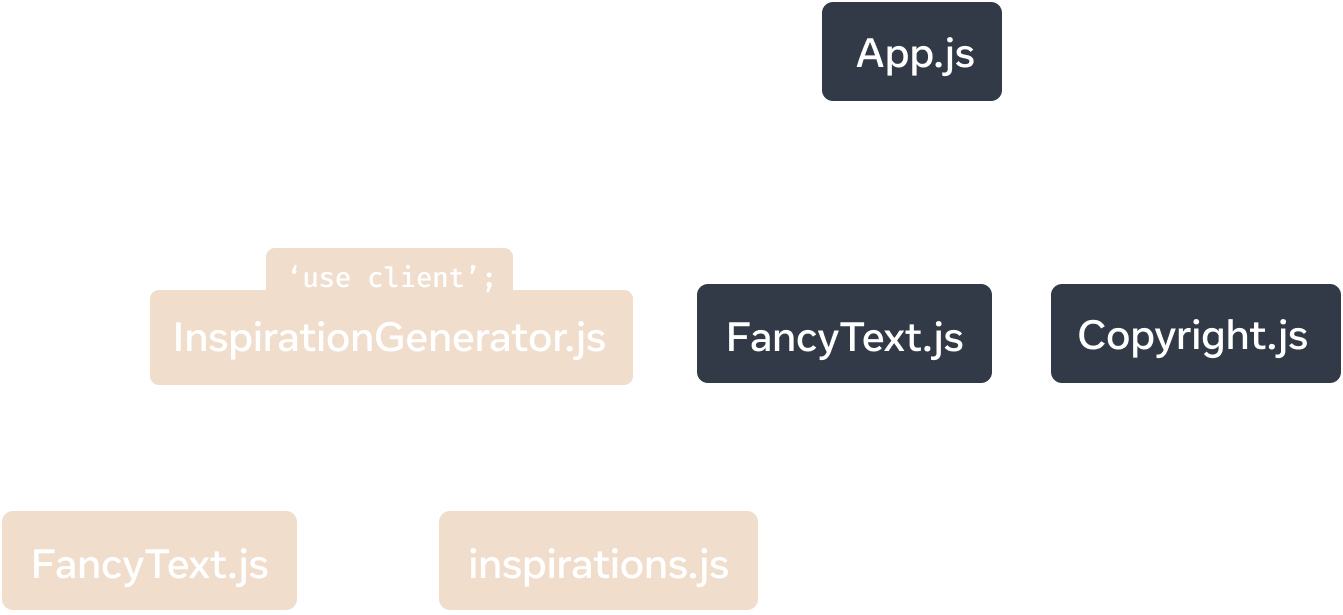
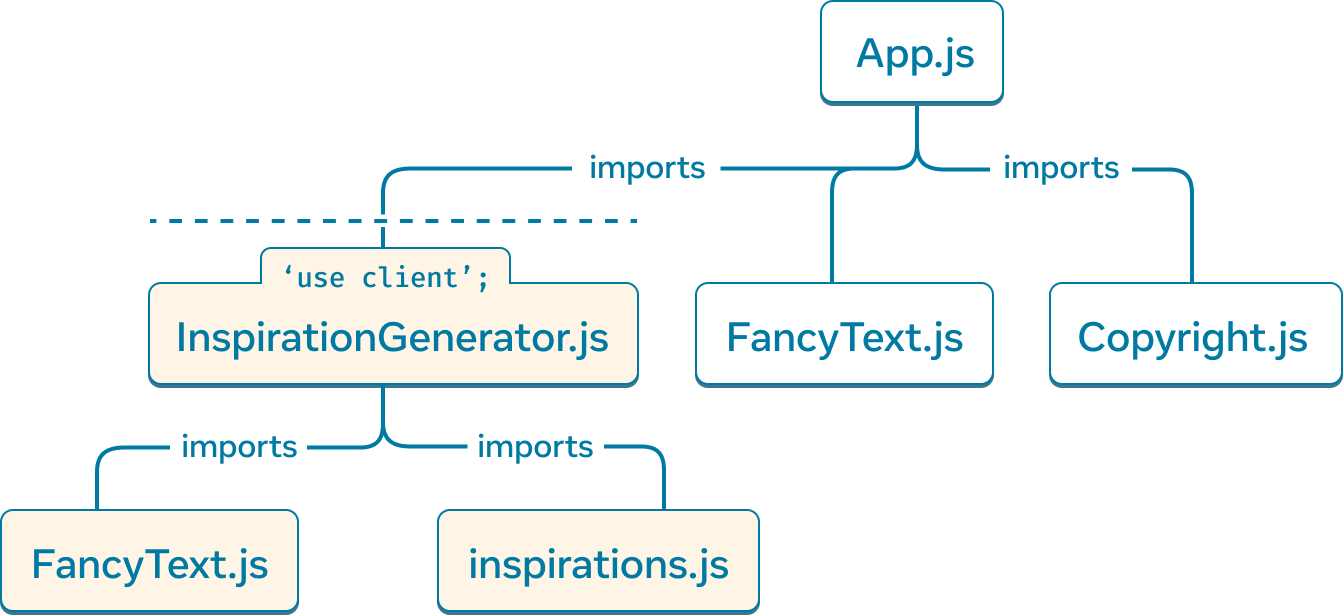
'use client', React Server Components app-ன் module dependency tree-ஐ segment செய்து, InspirationGenerator.js மற்றும் அதன் எல்லா dependencies-யையும் client-rendered ஆக mark செய்கிறது.
Render போது, framework root component-ஐ server-render செய்து render tree வழியாக தொடரும்; client-marked code-இலிருந்து import செய்யப்பட்ட எந்த code-யையும் evaluate செய்வதிலிருந்து opt out செய்யும்.
Render tree-ன் server-rendered பகுதி client-க்கு அனுப்பப்படும். Client, client code download செய்யப்பட்ட பிறகு, tree-ன் மீதியை rendering முடிக்கும்.
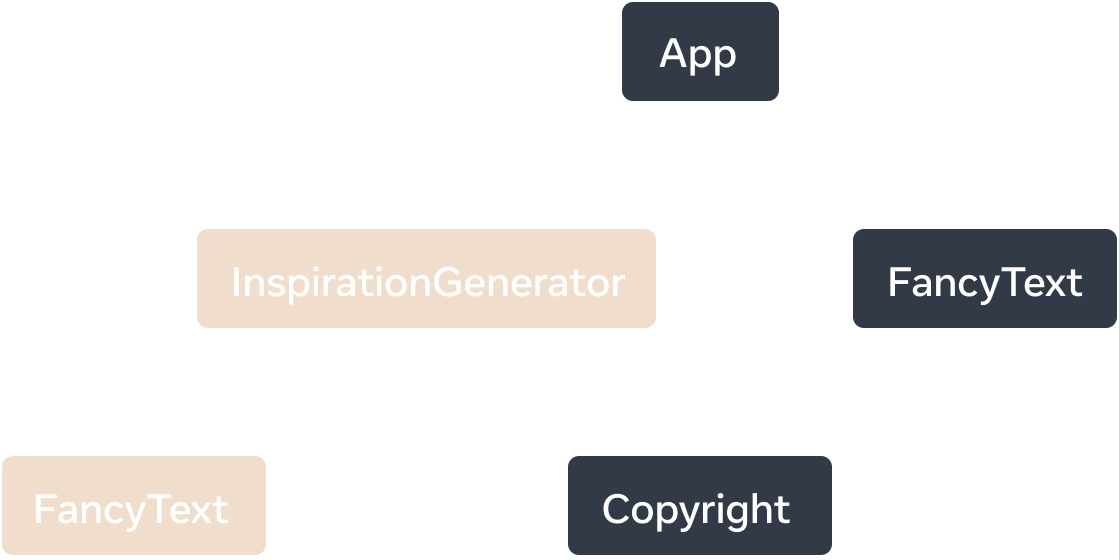
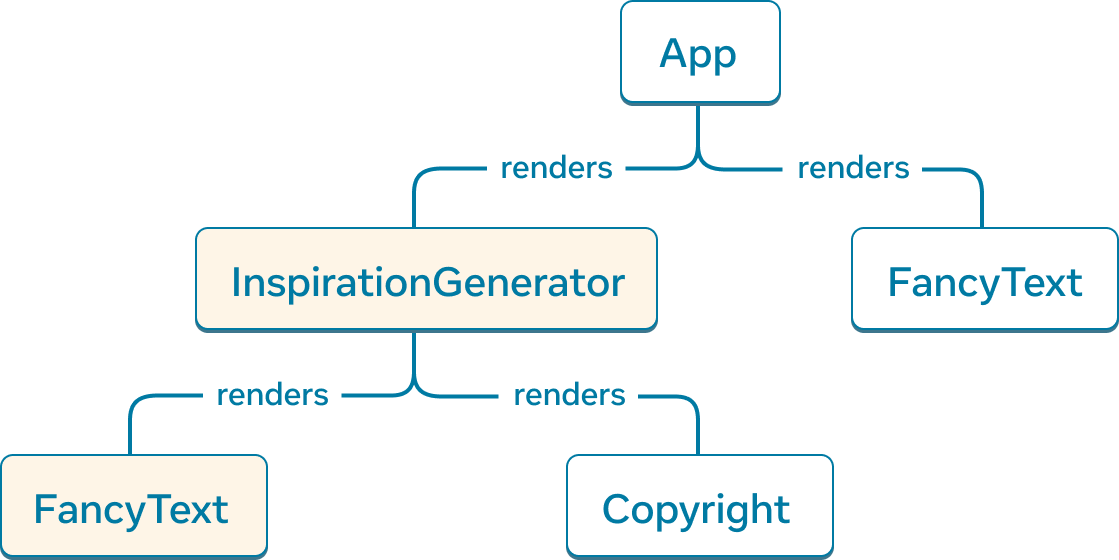
React Server Components app-க்கான render tree. InspirationGenerator மற்றும் அதன் child component FancyText, client-marked code-இலிருந்து exported components ஆகும்; அவை Client Components என கருதப்படுகின்றன.
பின்வரும் definitions-ஐ அறிமுகப்படுத்துகிறோம்:
- Client Components என்பது render tree-இல் client-இல் render செய்யப்படும் components.
- Server Components என்பது render tree-இல் server-இல் render செய்யப்படும் components.
Example app-ஐப் பார்த்தால், App, FancyText, மற்றும் Copyright அனைத்தும் server-rendered; அவை Server Components என கருதப்படுகின்றன. InspirationGenerator.js மற்றும் அதன் transitive dependencies client code ஆக mark செய்யப்பட்டதால், component InspirationGenerator மற்றும் அதன் child component FancyText Client Components.
Deep Dive
மேலுள்ள definitions படி, component FancyText Server Component-யும் Client Component-யும் ஆகிறது; அது எப்படி சாத்தியம்?
முதலில், “component” என்ற term மிகவும் precise அல்ல என்பதை clarify செய்வோம். “Component” இரண்டு ways-இல் புரிந்துகொள்ளப்படலாம்:
- “Component” என்பது component definition-ஐ குறிக்கலாம். பெரும்பாலான cases-இல் இது function ஆக இருக்கும்.
// This is a definition of a component
function MyComponent() {
  return <p>My Component</p>
}- ”Component” என்பது அதன் definition-ன் component usage-ஐயும் குறிக்கலாம்.
import MyComponent from './MyComponent';

function App() {
  // This is a usage of a component
  return <MyComponent />;
}
Concepts விளக்கும் போது இந்த imprecision பெரும்பாலும் முக்கியமில்லை; ஆனால் இந்த case-இல் அது முக்கியம்.
Server அல்லது Client Components பற்றி பேசும்போது, நாங்கள் component usages-ஐ குறிக்கிறோம்.
- Component
'use client'directive கொண்ட module-இல் define செய்யப்பட்டிருந்தாலோ, அல்லது component Client Component-இல் import செய்து call செய்யப்பட்டாலோ, அந்த component usage Client Component. - இல்லையெனில், அந்த component usage Server Component.
FancyText பற்றிய கேள்விக்கு திரும்பினால், component definition-இல் 'use client' directive இல்லை; ஆனால் அதற்கு இரண்டு usages உள்ளன.
App-ன் child ஆக உள்ள FancyText usage, அந்த usage-ஐ Server Component ஆக mark செய்கிறது. InspirationGenerator கீழ் FancyText import செய்து call செய்யப்படும் போது, InspirationGenerator 'use client' directive கொண்டிருப்பதால் அந்த FancyText usage Client Component ஆகும்.
இதன் அர்த்தம்: FancyText component definition server-இலும் evaluate செய்யப்படும்; மேலும் அதன் Client Component usage render செய்ய client-ஆலும் download செய்யப்படும்.
Deep Dive
Copyright, Client Component ஆன InspirationGenerator-ன் child ஆக render செய்யப்படுவதால், அது Server Component என்பது உங்களுக்கு ஆச்சரியமாக இருக்கலாம்.
'use client' server மற்றும் client code இடையிலான boundary-ஐ module dependency tree-இல் define செய்கிறது; render tree-இல் அல்ல என்பதை நினைவுகூருங்கள்.
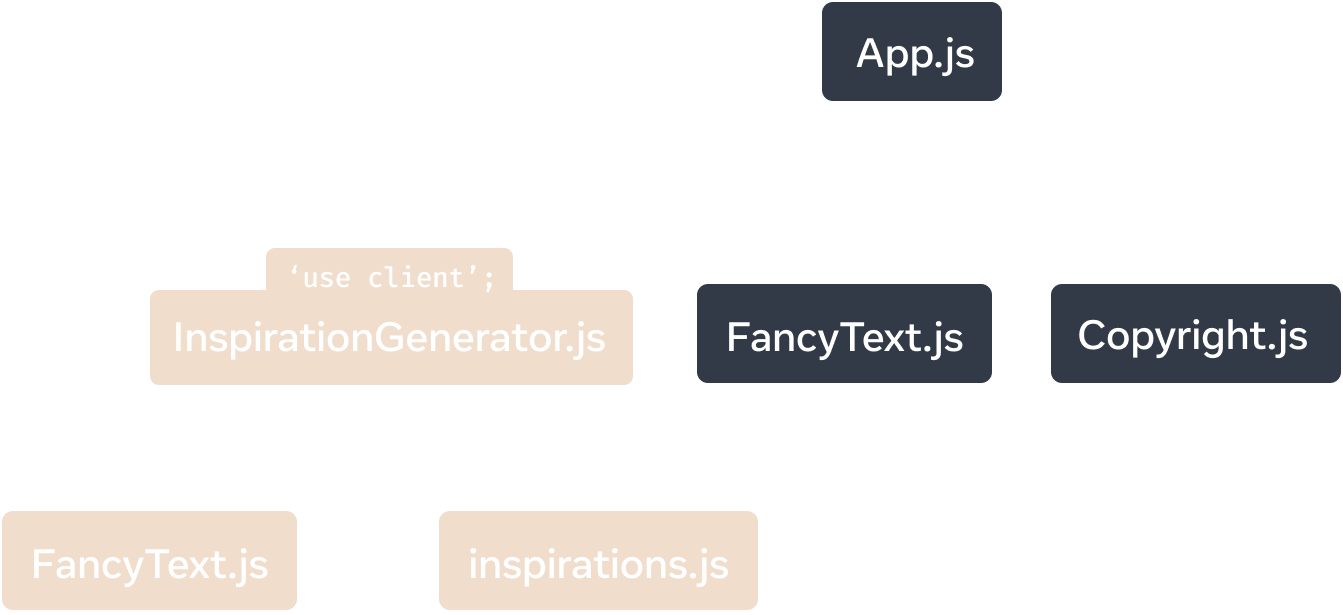
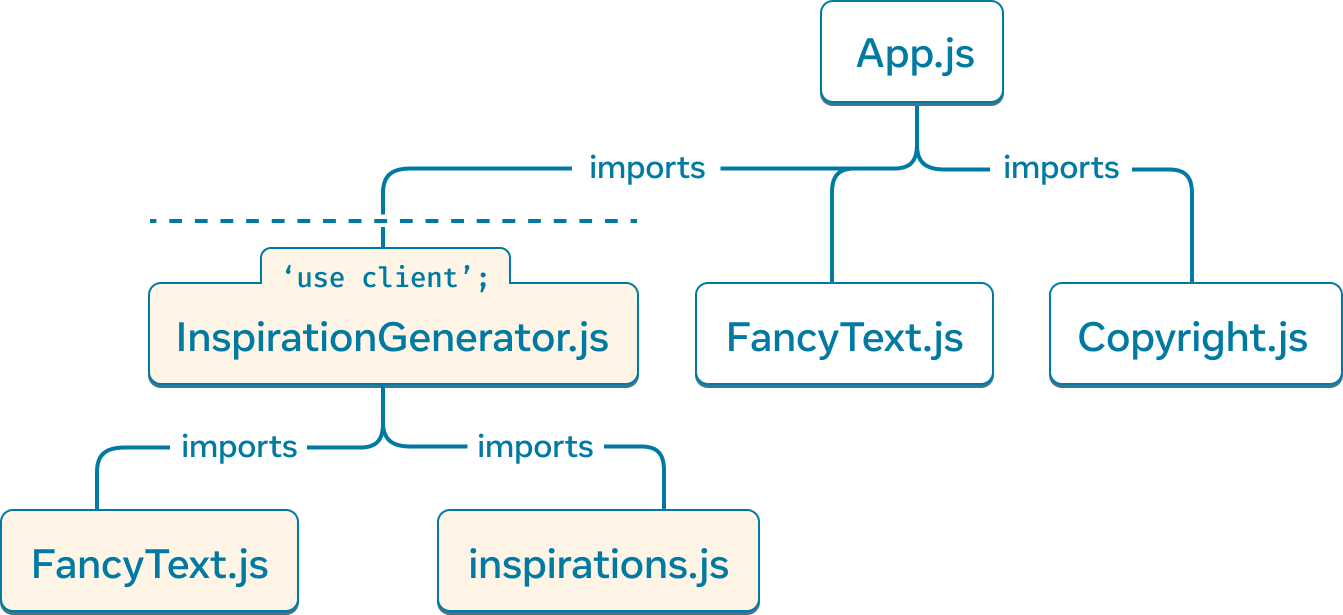
'use client', module dependency tree-இல் server மற்றும் client code இடையிலான boundary-ஐ define செய்கிறது.
Module dependency tree-இல், App.js, Copyright.js module-இலிருந்து Copyright-ஐ import செய்து call செய்கிறது என்பதைப் பார்க்கிறோம். Copyright.js-இல் 'use client' directive இல்லாததால், component usage server-இல் render செய்யப்படுகிறது. Root component என்பதால் App server-இல் render செய்யப்படுகிறது.
Client Components Server Components-ஐ render செய்யலாம், ஏனெனில் JSX-ஐ props ஆக pass செய்ய முடியும். இந்த case-இல், InspirationGenerator, Copyright-ஐ children ஆகப் பெறுகிறது. ஆனால் InspirationGenerator module ஒருபோதும் Copyright module-ஐ நேரடியாக import செய்யவோ component-ஐ call செய்யவோ இல்லை; அவை அனைத்தும் App மூலம் செய்யப்படுகின்றன. உண்மையில், InspirationGenerator render ஆகத் தொடங்கும் முன்பே Copyright component முழுமையாக execute செய்யப்படுகிறது.
Takeaway: components இடையிலான parent-child render relationship, அதே render environment-ஐ guarantee செய்யாது.
'use client' எப்போது பயன்படுத்த வேண்டும்
'use client' மூலம் components எப்போது Client Components ஆக இருக்க வேண்டும் என்பதை தீர்மானிக்கலாம். Server Components default என்பதால், எதையாவது client rendered ஆக mark செய்ய வேண்டிய நேரம் எது என்பதை தீர்மானிக்க Server Components-ன் advantages மற்றும் limitations குறித்த brief overview இதோ.
Simplicity-க்காக, Server Components பற்றி பேசுகிறோம்; ஆனால் அதே principles உங்கள் app-இல் server run ஆகும் அனைத்து code-க்கும் பொருந்தும்.
Server Components-ன் advantages
- Server Components, client-க்கு அனுப்பப்பட்டு run செய்யப்படும் code அளவை குறைக்கலாம். Client modules மட்டுமே bundled செய்து client மூலம் evaluated செய்யப்படும்.
- Server-இல் run ஆகுவதால் Server Components பயன் பெறுகின்றன. அவை local filesystem access செய்யலாம்; data fetches மற்றும் network requests-க்கு low latency அனுபவிக்கலாம்.
Server Components-ன் limitations
- Event handlers client மூலம் register செய்து trigger செய்யப்பட வேண்டும் என்பதால் Server Components interaction support செய்ய முடியாது.
- உதாரணமாக,
onClickபோன்ற event handlers Client Components-இல் மட்டுமே define செய்ய முடியும்.
- உதாரணமாக,
- Server Components பெரும்பாலான Hooks-ஐ பயன்படுத்த முடியாது.
- Server Components render செய்யப்படும்போது, அவற்றின் output essentially client render செய்ய வேண்டிய components பட்டியல். Server Components render-க்கு பிறகு memory-இல் persist ஆகாது; அவற்றுக்கு சொந்த state இருக்க முடியாது.
Server Components return செய்யும் serializable types
எந்த React app-இலும் போல, parent components child components-க்கு data pass செய்கின்றன. அவை வெவ்வேறு environments-இல் render செய்யப்படுவதால், Server Component-இலிருந்து Client Component-க்கு data pass செய்வதற்கு கூடுதல் கவனம் தேவை.
Server Component-இலிருந்து Client Component-க்கு pass செய்யப்படும் prop values serializable ஆக இருக்க வேண்டும்.
Serializable props-இல் அடங்குவது:
- Primitives
- Serializable values கொண்ட Iterables
- String
- Array
- Map
- Set
- TypedArray மற்றும் ArrayBuffer
- Date
- Plain objects: object initializers மூலம் உருவாக்கப்பட்டவை, serializable properties உடன்
- Server Functions ஆன functions
- Client அல்லது Server Component elements (JSX)
- Promises
குறிப்பாக, இவை supported அல்ல:
- Client-marked modules-இலிருந்து export செய்யப்படாத அல்லது
'use server'கொண்டு mark செய்யப்படாத Functions - Classes
- எந்த class-ன் instances ஆன objects (மேலே mentioned built-ins தவிர) அல்லது null prototype கொண்ட objects
- Globally registered அல்லாத symbols, எ.கா.
Symbol('my new symbol')
Usage
Interactivity மற்றும் state உடன் build செய்தல்
'use client';

import { useState } from 'react';

export default function Counter({initialValue = 0}) {
  const [countValue, setCountValue] = useState(initialValue);
  const increment = () => setCountValue(countValue + 1);
  const decrement = () => setCountValue(countValue - 1);
  return (
    <>
      <h2>Count value: {countValue}</h2>
      <button onClick={increment}>+1</button>
      <button onClick={decrement}>-1</button>
    </>
  );
}
Counter-க்கு value increment அல்லது decrement செய்ய useState Hook மற்றும் event handlers இரண்டும் தேவைப்படுவதால், இந்த component Client Component ஆக இருக்க வேண்டும்; top-இல் 'use client' directive தேவைப்படும்.
இதற்கு மாறாக, interaction இல்லாமல் UI render செய்யும் component Client Component ஆக இருக்க தேவையில்லை.
import { readFile } from 'node:fs/promises';
import Counter from './Counter';

export default async function CounterContainer() {
  const initialValue = await readFile('/path/to/counter_value');
  return <Counter initialValue={initialValue} />
}
உதாரணமாக, Counter-ன் parent component CounterContainer interactive அல்ல; state பயன்படுத்துவதில்லை; அதனால் அதற்கு 'use client' தேவையில்லை. கூடுதலாக, CounterContainer server-இல் local file system-இலிருந்து read செய்கிறது; அது Server Component-இல் மட்டுமே சாத்தியம். எனவே அது Server Component ஆக இருக்க வேண்டும்.
Server-only அல்லது client-only features எதையும் பயன்படுத்தாத, render செய்யும் இடத்துக்கு agnostic ஆக இருக்கக்கூடிய components-யும் உள்ளன. எங்கள் முந்தைய example-இல், FancyText அப்படியான component.
export default function FancyText({title, text}) {
  return title
    ? <h1 className='fancy title'>{text}</h1>
    : <h3 className='fancy cursive'>{text}</h3>
}
இந்த case-இல், 'use client' directive சேர்க்கவில்லை; இதனால் Server Component-இலிருந்து reference செய்யும்போது FancyText-ன் source code அல்ல, அதன் output browser-க்கு அனுப்பப்படும். முந்தைய Inspirations app example-இல் demonstrate செய்தபடி, import செய்து பயன்படுத்தப்படும் இடத்தைப் பொறுத்து FancyText Server அல்லது Client Component இரண்டாகவும் பயன்படுத்தப்படுகிறது.
ஆனால் FancyText-ன் HTML output அதன் source code-ஐ (dependencies உட்பட) ஒப்பிடும்போது பெரியதாக இருந்தால், அதை எப்போதும் Client Component ஆக force செய்வது efficient ஆக இருக்கலாம். Long SVG path string return செய்யும் components, component-ஐ Client Component ஆக force செய்வது more efficient ஆக இருக்கக்கூடிய ஒரு case.
Client APIs பயன்படுத்துதல்
உங்கள் React app, web storage, audio மற்றும் video manipulation, device hardware போன்ற browser APIs உட்பட மற்ற client-specific APIs பயன்படுத்தலாம்.
இந்த example-இல், component canvas element manipulate செய்ய DOM APIs பயன்படுத்துகிறது. அந்த APIs browser-இல் மட்டுமே கிடைப்பதால், இது Client Component ஆக mark செய்யப்பட வேண்டும்.
'use client';

import {useRef, useEffect} from 'react';

export default function Circle() {
  const ref = useRef(null);
  useLayoutEffect(() => {
    const canvas = ref.current;
    const context = canvas.getContext('2d');
    context.reset();
    context.beginPath();
    context.arc(100, 75, 50, 0, 2 * Math.PI);
    context.stroke();
  });
  return <canvas ref={ref} />;
}
Third-party libraries பயன்படுத்துதல்
React app-இல், common UI patterns அல்லது logic handle செய்ய நீங்கள் third-party libraries-ஐ அடிக்கடி leverage செய்வீர்கள்.
இந்த libraries component Hooks அல்லது client APIs-ஐ சார்ந்திருக்கலாம். பின்வரும் React APIs-யில் ஏதேனும் ஒன்றைப் பயன்படுத்தும் third-party components client-இல் run ஆக வேண்டும்:
- createContext
reactமற்றும்react-domHooks,useமற்றும்useIdதவிர- forwardRef
- memo
- startTransition
- Client APIs பயன்படுத்தினால், எ.கா. DOM insertion அல்லது native platform views
இந்த libraries React Server Components உடன் compatible ஆக update செய்யப்பட்டிருந்தால், அவற்றில் ஏற்கனவே சொந்த 'use client' markers இருக்கும்; எனவே உங்கள் Server Components-இலிருந்து அவற்றை நேரடியாகப் பயன்படுத்தலாம். Library update செய்யப்படவில்லை என்றாலோ, அல்லது component-க்கு client-இல் மட்டுமே specify செய்யக்கூடிய event handlers போன்ற props தேவைப்பட்டாலோ, நீங்கள் பயன்படுத்த விரும்பும் third-party Client Component மற்றும் உங்கள் Server Component இடையில் உங்கள் சொந்த Client Component file சேர்க்க வேண்டியிருக்கலாம்.